
Download Propertify – AI‑Powered Virtual Property Staging Tool
Overview & Key Features
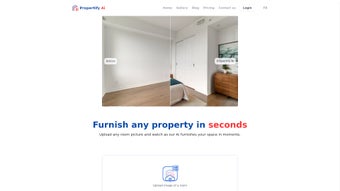
Propertify AI is a cloud‑based web application that completely redefines how real‑estate professionals stage a property for sale. By leveraging cutting‑edge artificial intelligence, the platform lets users upload a simple photograph of any interior space and instantly transform it into a fully furnished, camera‑ready image. Whether you need a sleek modern look, a breezy coastal vibe, or a timeless mid‑century aesthetic, Propertify’s AI engine analyses the room’s dimensions, lighting and existing décor, then generates a realistic furniture layout in under ten seconds.
The service also includes a smart decluttering function that removes unwanted objects, ensuring every corner of the room appears tidy and inviting. Because the tool is subscription‑based, agents and brokers can stage unlimited listings without the hefty cost of hiring a physical staging crew or purchasing expensive 3‑D rendering software. The intuitive drag‑and‑drop interface requires no design experience—just a few clicks, and the AI does the heavy lifting.
In addition to boosting visual appeal, the rapid turnaround helps agents publish fresh listings faster, keeping the property top‑of‑mind for prospective buyers on platforms like Zillow, Realtor.com, and MLS portals. Propertify thus combines speed, affordability, and photorealistic quality, making it a compelling addition to any real‑estate marketing toolkit.
- Instant AI Staging: Upload a JPEG or PNG and receive a fully furnished scene in ~10 seconds.
- Multiple Design Styles: Choose from modern, coastal, mid‑century, industrial, and more.
- Room‑Type Support: Bedrooms, living rooms, kitchens, bathrooms, home offices, and entryways.
- Smart Decluttering: AI removes clutter, stray items, and background distractions automatically.
- High‑Resolution Output: Export images at 4K resolution, ready for MLS, social media, and print brochures.
- Batch Processing: Upload up to 20 images at once for large property portfolios.
- Custom Furniture Library: Add brand‑specific pieces or your own catalog for a personalized touch.
- Secure Cloud Storage: All images are stored on encrypted servers with GDPR‑compliant privacy.
- Subscription Flexibility: Monthly, quarterly, or annual plans with unlimited staging credits.
- Integrations: Direct export to popular CRM and listing services via API.
Each feature is designed to solve a real‑world pain point for agents. The instant AI staging eliminates the need for costly physical furniture rentals, while the decluttering engine helps showcase a property’s true potential even when the space is currently occupied or messy. The ability to select a design style means you can tailor the visual narrative to the target buyer demographic—think bright, airy coastal décor for beachfront condos, or sleek industrial for loft apartments.
Batch processing speeds up the workflow for large multi‑unit developments, and the custom library ensures brand consistency across all listings. Because everything runs in the browser, there’s no heavy software download, and the secure cloud architecture protects client data while offering easy access from any device. Propertify also continuously updates its AI models behind the scenes, guaranteeing that the latest design trends and rendering techniques are always at your fingertips.
Installation & Usage Instructions
Step‑by‑Step Setup
- Create an Account: Visit Propertify.ai and click “Sign Up.” Fill in your name, business email, and preferred payment method. A verification email will be sent—confirm to activate your account.
- Select a Plan: Choose between the “Starter” (5 stages/month), “Professional” (unlimited), or “Enterprise” (white‑label) subscription. All plans include a 14‑day free trial, allowing you to test the AI engine without risk.
- Upload Your Images: From the dashboard, click “New Project,” then drag‑and‑drop JPEG/PNG files or use the “Browse” button. Propertify recommends a minimum resolution of 1080 px for optimal AI analysis.
- Choose a Style: After the image uploads, a side panel appears with style thumbnails. Select “Modern,” “Coastal,” “Mid‑Century,” etc. You can also toggle “Declutter” on or off.
- Review & Edit (Optional): The AI generates a staged version in ~10 seconds. Use the built‑in editor to move, resize, or replace furniture pieces if you desire a bespoke layout.
- Export the Final Image: Click “Download” to save a high‑resolution PNG or JPG. You can also push the file directly to your MLS account via the API integration.
- Save to Library: Store the finished image in your Propertify cloud folder for future reference or to reuse in marketing materials.
The entire workflow is browser‑based, meaning there’s no need for a traditional installation. Propertify runs on any modern web browser (Chrome, Edge, Safari, Firefox) and automatically updates its AI models in the background, so you always benefit from the latest improvements without manual patches. For teams, the platform offers role‑based access controls, allowing admins to set permissions for agents, photographers, or marketing staff. If you encounter any issues, a live chat widget in the lower‑right corner connects you to a support specialist 24/7, and a comprehensive knowledge base provides step‑by‑step tutorials, video walkthroughs, and best‑practice guides. Because the processing occurs in the cloud, even lower‑end laptops can handle large batches without lag, and the platform’s responsive design ensures a smooth experience on tablets and smartphones while you’re on‑site at a property.
Compatibility, Pros & Cons, and Frequently Asked Questions
Propertify is a web‑native solution, making it compatible with Windows 10/11, macOS 10.15+, Chrome OS, Android 8+, and iOS 13+. Because all processing occurs on secure cloud servers, the local device only needs an internet connection and a modern browser. This cross‑platform flexibility ensures agents can stage properties from a desktop office, a laptop on‑the‑go, or even a tablet while touring a home.
Pros
- Lightning‑fast AI rendering (≈10 seconds per image).
- No expensive hardware or software licenses required.
- Extensive style library catering to diverse buyer demographics.
- Built‑in decluttering removes distractions automatically.
- Unlimited high‑resolution exports with commercial usage rights.
- Secure, GDPR‑compliant cloud storage.
- API integration with major MLS and CRM platforms.
- 24/7 live support and detailed knowledge base.
Cons
- Requires a stable internet connection; offline staging isn’t available.
- Subscription model may be less attractive for occasional users.
- AI may occasionally misinterpret unconventional room layouts, requiring manual tweaks.
- Advanced custom furniture uploads are limited to paid “Enterprise” tier.
Overall Rating: 4.5/5 – Propertify delivers on its promise of rapid, realistic virtual staging while keeping costs low for professionals.
Frequently Asked Questions
How long does it take to stage an image?
The AI engine processes each photo in roughly 10 seconds, delivering a fully furnished version ready for download.
Can I use Propertify for commercial properties?
Yes. The platform supports office spaces, retail storefronts, and even hotel rooms. Simply select the appropriate “Commercial” style preset for optimal results.
Is there a limit to the number of images I can stage per month?
The “Starter” plan limits you to 5 staged images per month, while the “Professional” and “Enterprise” plans offer unlimited staging. All plans include a 14‑day free trial with full unlimited access.
Do I need any design skills to edit the AI‑generated staging?
No. Propertify’s built‑in editor is drag‑and‑drop and fully intuitive. You can reposition furniture, swap pieces, or adjust colors with a single click, even if you have zero design experience.
How secure is my data and the images I upload?
All uploads are encrypted in transit (TLS 1.3) and at rest (AES‑256). Propertify complies with GDPR, CCPA, and other major privacy regulations, ensuring your client images remain confidential.
Conclusion & Call to Action
Propertify AI stands out as a game‑changing tool for anyone who needs high‑quality virtual staging without the logistical headaches of traditional furniture rentals. Its near‑instant processing, diverse design palettes, and built‑in decluttering make it especially valuable for real‑estate agents looking to accelerate listing turnaround and attract more qualified buyers. While a reliable internet connection is essential and the subscription model may not suit very occasional users, the overall value—measured in saved time, reduced staging costs, and higher engagement on listing platforms—far outweighs these minor drawbacks. If you’re ready to modernize your property marketing workflow, simply sign up for the free trial today and experience the power of AI‑driven staging for yourself. Embrace the future of real‑estate marketing, boost your conversion rates, and let Propertify do the heavy lifting while you focus on closing deals.



.png)



